
CAN FD Frame Analyzer
Windows software for visualizing the evolution of CAN and CAN FD signals
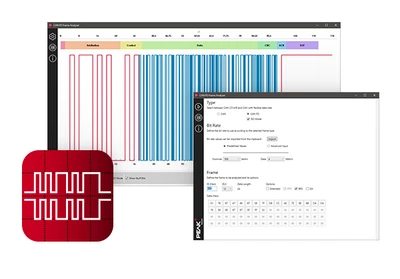
DownloadThe free Windows® CAN FD Frame Analyzer software can be used to visualize the signal path of any CAN or CAN FD frame. The CAN message and bit rates are freely configurable. The various components of the CAN frame are named and color-coded.
Changes and their effects on the signal path are directly traceable. Users can thus easily deepen their understanding of the CAN protocol and, in particular, the CAN FD specification.
Features
- Software for visualizing the evolution of signals in a CAN frame
- Support for CAN FD specifications (ISO/Non-ISO) and CAN 2.0 A/B
- Configuration of the CAN frame to display by defining the CAN ID, DLC, CAN data and various options
- Setting the nominal bit rate and data bit rate using predefined selection lists or custom register values
- Marking and naming of the different structural sections of the CAN frame
- CAN FD signal evolution display with or without Bit Rate Switch
- Optional signal evolution display with Stuff bits
- Display of frame length in bits and frame duration in µs
- Display of the calculated CRC value
System requirements
- Windows® 11 (x64/ARM64), 10 (x86/x64)
| Type | Free Windows software |
|---|---|
| Protocols | CAN FD (ISO/Non-ISO), CAN 2.0 A/B |
CAN FD Frame Analyzer
Software for visualizing the evolution of CAN and CAN FD signals for Windows® 11 (x64/ARM64), 10 (x86/x64)
Download
